
ArtPic: Photo & Video Editor
AdoreApps MediaArt & Design
4.5153.00 Reviews
- Version
- 1.0.45
- Installs
- 10.00M
- Age Rating
- Teen
Screenshots
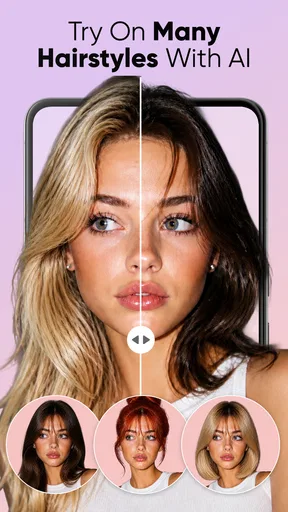


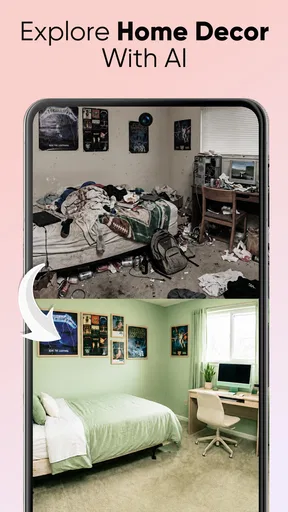
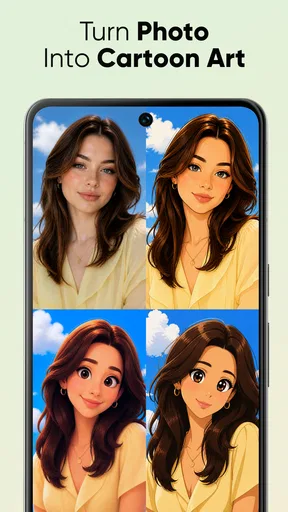


Our Review of ArtPic: Photo & Video Editor
 Analysis by Appyee
My first reaction to ArtPic: Photo & Video Editor was that it tries to make playful image-making feel approachable rather than turning every edit into a technical project. That is a useful idea for quick social posts, but it also means I’d treat it as a creative toolbox, not as a replacement for a careful desktop workflow. Its mix of face-focused effects, photo and video editing, and AI avatar creation gives it a clear casual appeal; the best results still depend on choosing the right source image and keeping expectations realistic.
First Impressions and Interface
When I first opened ArtPic, I was greeted by a sleek and intuitive interface. Everything is laid out in a way that makes sense, even for someone like me who tends to get lost in tech stuff. The navigation is smooth, and I didn’t feel overwhelmed by too many options, which is often the case with editing apps.
The home screen offers quick access to both photo and video editing tools. There’s also a nice little feed of inspiration where you can see what other users are creating. It’s a great way to spark some creativity when you’re in a rut.
That easy entry matters most when I have one specific task in mind: make a portrait more amusing, prepare a short clip for a group chat, or try an avatar look without first learning a complicated editor. I would start with a clear, well-lit face and a simple background. Those choices make it easier to judge whether an effect is working, rather than confusing a weak source photo with a weak edit.
A practical workflow is to keep the original photo untouched, make one version with a subtle treatment, then try a more exaggerated version separately. For face changes in particular, a small adjustment can look more convincing than stacking several transformations. I also find it useful to check the result at full size before sharing: an effect that looks amusing as a tiny preview can reveal awkward edges or mismatched details once enlarged.
Photo Editing Features
Alright, let’s dive into the fun part—the photo editing features. One of the first things I noticed is the plethora of filters available. Whether you’re looking to add a vintage vibe or a modern, crisp look, there’s something for everyone. The best part? You can adjust the intensity of each filter, letting you create a unique look without overdoing it.
Beyond filters, ArtPic offers a variety of tools to tweak your photos. From adjusting brightness, contrast, and saturation to more advanced features like curves and selective color adjustments, it’s all there. I particularly loved the retouch tools, which are perfect for those quick touch-ups. The blemish remover is a lifesaver!
The key trade-off with a broad collection of effects is that it can tempt you to keep changing things after the picture already works. I’d use retouching to tidy a small distraction, not to erase every natural detail; too much smoothing can make a familiar face look oddly artificial. Likewise, a strong filter can alter skin tones, so I’d check the image against the original before deciding that the finished version still feels like the person in the photo.
For a casual profile picture, I’d prioritize a clean crop and balanced light before adding a stylized look. For a photo that needs to feel natural—such as a family picture or a professional headshot—I’d keep the effects restrained and consider whether a conventional editor with precise, predictable controls is a better fit. ArtPic’s appeal is the quick creative result, rather than painstaking retouching where every small adjustment must be consistent across a batch of images.
Video Editing Capabilities
Now, onto the video editing side of things. If you’ve ever tried editing videos on your phone, you know it can be a bit of a hassle. But with ArtPic, it was surprisingly easy. The app supports multiple video formats, and the editing timeline is user-friendly.
You can trim, cut, and merge clips with ease. Adding music or voiceovers is a breeze, and the library of royalty-free music is a nice touch. One feature that stood out to me was the ability to add animated text and stickers. It’s a fun way to make your videos pop and keep your audience engaged.
For an everyday example, imagine picking a few short clips from a weekend outing and making a quick recap for friends. I’d trim away the shaky starts and dead time first, then add text only where it helps explain a moment. That order keeps decoration from taking over the story. If the clip is meant to be watched with sound off, readable text can help; if the music or voice matters, I’d listen through the whole export before posting rather than relying on a silent preview.
That kind of short, informal edit is where a phone-first tool makes sense. If I needed detailed audio mixing, carefully timed subtitles, or a long project with many layers, I’d reach for a dedicated video editor instead. A simple timeline is friendly, but it is not automatically the right environment for work that demands frame-level control or a repeatable production process.
Special Effects and Creativity
For those who love to get creative, ArtPic doesn’t disappoint. The app includes a variety of special effects like double exposure, glitch effects, and even some cool AI-powered tools. The AI art generator is particularly fascinating, turning your photos into artwork with just a few taps.
Another nifty feature is the collage maker. It allows you to combine multiple photos into one seamless image. The templates are stylish, and you can customize them to your heart’s content. It’s perfect for creating Instagram-worthy posts or even some personalized content for your blog.
Face transformations and avatar-style results are best approached as playful interpretations, not guaranteed likenesses. I’d try a few different source portraits if the first result feels off: a straight-on face with an unobstructed expression gives the app a clearer starting point than a profile view, heavy shadow, or a face partly covered by hair or accessories. This is a useful test before deciding whether the style suits you; the same effect can feel charming on one photo and distracting on another.
There is also a privacy and audience consideration whenever an edit changes someone else’s face. I’d keep such edits to friends who are comfortable being included, and I’d be clear when a heavily altered image could otherwise be mistaken for a real moment. That is not a reason to avoid playful effects; it is simply a sensible boundary, especially when sharing beyond a private group.
Sharing and Community
Once you’ve crafted your masterpiece, sharing is simple. The app integrates seamlessly with all major social media platforms, allowing you to upload your edited photos and videos directly from the app. There’s also an option to save your work in high resolution, which is a must for any serious editor.
What’s really cool is the community aspect of ArtPic. You can follow other creators, like their work, and even participate in challenges. It’s a great way to get feedback and improve your skills while connecting with like-minded individuals.
I’d still review a finished image before sending it anywhere, particularly if it contains a face swap or a visual joke that depends on context. A quick check of the crop, text placement, and overall tone can prevent an edit from landing differently than intended. For work or formal announcements, I’d usually export a restrained image and avoid effects that make the subject harder to recognize.
Compared with the usual alternatives, ArtPic’s strength is the combination of portrait play and quick edits in one casual destination. A standard photo editor may offer a more focused set of adjustments, while a dedicated video app can be more suitable for elaborate timelines. If I only want a straightforward crop, exposure correction, or color tweak, switching to the phone’s built-in tools may be faster. ArtPic makes more sense when the aim is expressive transformation, rather than simply correcting a picture.
Who Will Get the Most from It
ArtPic is a good match for people who like experimenting with portraits, making lighthearted content, or turning a handful of phone clips into something shareable without a steep learning curve. It may also suit a beginner who wants to explore visual styles before moving on to software with more detailed controls. The Art & Design category is a natural fit for that creative use, and AdoreApps Media is the developer behind the app.
I would be more cautious if you need consistent results across a large set of images, exact color work, or a polished video for a client. A face effect can be fun without being dependable enough for a formal deliverable, and a friendly interface does not remove the need to inspect edits carefully. If you prefer minimal processing or do not want to spend time trying different effects, a basic camera editor may suit you better.
The app is free to start, with in-app purchases ranging from $2.99 to $129.99 per item. I’d explore the experience before paying for anything and check what a purchase unlocks at the point of choice, especially if I only expect to use one particular effect. Its Teen content rating is also worth keeping in mind for households deciding which creative apps are appropriate for younger users.
Final Thoughts
Overall, I’ve been thoroughly impressed with ArtPic: Photo & Video Editor. It’s a comprehensive editing tool that caters to both beginners and seasoned pros. Whether you’re looking to enhance your selfies or create a professional-looking video, this app has got your back.
Its current version is 1.0.30, and it requires Android 7.0 or later. It has been available since August 8, 2024, and has passed five million installs, which suggests that plenty of people are curious about its style of editing. Its average rating is 3.4 from around fifteen thousand ratings, alongside fifty-six written reviews. I’d treat that rating as a reminder to try the app with a real photo or clip that resembles what I plan to make, rather than assuming every tool will suit every user.
If you’re ready to take your photo and video editing to the next level, I’d highly recommend giving ArtPic a try. It’s available for download on both Android and iOS, so no one’s left out. Trust me, your social media game will thank you.
My recommendation is narrower than that final enthusiasm might suggest: I’d try it if face-focused creativity and quick, shareable edits sound fun, but I would not choose it as my only editor for demanding projects. Start with one portrait, compare a gentle effect with a bold one, and see whether the result looks right to you before investing more time or money. For casual experimentation, that is exactly the sort of low-pressure creative detour I enjoy; for precision and consistency, a specialist tool remains the better choice.
Verdict
Strengths of ArtPic: Photo & Video Editor
- Intuitive user interface for easy editing.
- Wide range of filters and effects available.
- Supports high-resolution photo editing.
- Video editing tools are comprehensive.
- Regular updates with new features.
Limitations of ArtPic: Photo & Video Editor
- Free version includes ads.
- Some features locked behind paywall.
- Occasional slowdowns on older devices.
- Limited export formats available.
- Requires internet for certain features.
Other Releases by AdoreApps Media
View All
Picshiner - AI Photo Editor
Art & Design3.1
Similar Picks in This Category
View All
Canva: AI Photo & Video Editor
Canva4.8

PENUP – Drawing-sharing SNS
Samsung Electronics Co., Ltd.4.5

Crafto
Kutumb App4.6

Sketchbook
Sketchbook4.1

ibis Paint X
ibis inc.4.5

Adobe Express: AI Photo, Video
Adobe4.6
Frequently Asked Questions
What features does ArtPic: Photo & Video Editor offer?
ArtPic: Photo & Video Editor boasts a wide range of features, including advanced photo filters, video editing tools, collage creation, and an intuitive interface for both beginners and pros. Users can enhance images with AI-powered effects, cut and merge videos seamlessly, and apply artistic overlays to make their content stand out.
Is ArtPic: Photo & Video Editor free to use?
ArtPic offers a free version with basic features, but to unlock premium tools and effects, users must subscribe to a paid plan. The subscription provides access to exclusive filters, advanced editing options, and removes ads for a smoother experience. It’s a great investment for serious editors.
Can ArtPic: Photo & Video Editor be used offline?
Yes, ArtPic: Photo & Video Editor can be used offline for basic editing tasks. However, some features, such as downloading additional filters and accessing cloud storage, require an internet connection. Offline mode ensures you can edit on the go without relying on data or Wi-Fi.
Does ArtPic: Photo & Video Editor support all file formats?
ArtPic supports most popular photo and video formats, including JPEG, PNG, MP4, and MOV. However, it may not support less common or proprietary formats. It’s advisable to check the compatibility of your files before importing them into the app to ensure smooth editing.
Is ArtPic: Photo & Video Editor suitable for beginners?
Absolutely! ArtPic is designed with user-friendly navigation and intuitive tools, making it perfect for beginners. The app also offers tutorials and tips to help new users get started. While it provides powerful features for professional editing, its simplicity ensures anyone can create stunning visuals.
